

About domains and DNS
Internet transfer protocols identify individual network nodes (computers providing certain services to other computers) using IP addresses, which are world-unique. And IP address in the older transfer protocol is a series of numbers divided by dots – 217.31.201.43, or a series of numbers and letters divided by colons – 2001:200:8002:203:47ff:fea5:3085 in the new IP protocol.
Such addresses are very hard to remember for the human mind, just as it is hard to remember lots of telephone numbers. This is why we have phonebooks, in which people list telephone numbers together with the names of their owners. In modern phones, users just select a name from the internal phonebook, press the call button and the phone calls the telephone number associated with that name.
The DNS (Domain Name System) works as a phone book for IP addressees. The Domain Name System enables us to assign a symbolic name - called the domain name - to the IP address. Such name is easier to remember for users - they can type it in the browser's address bar (I know a Czech company XY, I can type www.XY.cz into the address bar). Similarly to a phone, the browser looks into a "phone book", finds the correct record and automatically connects to the IP address corresponding to the domain name and displays the page.
If there was only one domain name list, we would have problems. Everyone would want to call their mailserver „mail“, or call their computers by the name of their users. The same name would have to correspond to several addresses, which is not possible. People would start using cryptic names and the system would cease to provide its basic function. The size of the phone book for the entire world would be the second problem.
These problems were solved by using a hierarchy. Domain names were divided into levels, divided by the dot sign, whose complete string, for example mail.nic.cz, constitutes a qualified domain name. Individual domain name levels are numbered in reverse order. The last part of the domain name is the first level domain, or top level domain (TLD), this is the .cz in our example above. The second level domain (SLD) is .nic. There also are third, fourth, fifth level and so on domains. Our example contains a third level domain – .mail.
Thanks to hierarchy, the space for creation of domain names is bigger. It is enough for individual names to be unique within a given level. Because the list does not have to be kept at one place, only a list of sub-domains for each domain is kept and the hierarchic system is much simpler. This creates a domain name tree with individual domain levels. The domain tree root contains information on all TLD's, such as .com, .cz, .de .fr, etc. Each of those TLD's has its own registry of all SLD's within it. For example the .cz TLD registry contains all SLD's, for example nic.cz, seznam.cz, idnes.cz, etc. Each of those SLD's has a list of third level domains - for example www.nic.cz, enum.nic.cz, fred.nic.cz, etc. The domain tree grows to the subsequent level domains using the same principle.
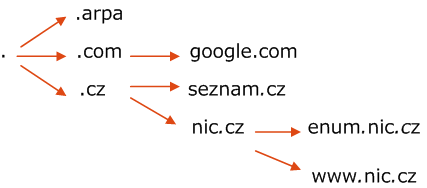
Each domain registry has its organisation or person acting as its administrator and sets rules for registering domain names for the sub-domains. All administrators of national TLD's may be found in the lists at the IANA website. These rules usually prescribe: How a domain name looks, what characters can it contain, how long can it be, etc.
- Limitations in who can register a domain name
- Method of registration
- How much does registration cost
Some registers are more open and enable anyone to register a domain name. Others have stricter rules. See Rules and policies for rules on registering .cz domains.
Information on domains are saved in nameservers. Either as direct information on the IP addresses belonging to the given domain name, or as a link to another nameserver for a given domain name. In practice, DNS's are used as follows: each computer has a pre-defined nameserver which it uses to translate domain names. When a user writes a domain name into their browser's address bar, the computer sends a query to the nameserver for the IP address corresponding to the domain name. The NS either replies directly when it knows the IP address, or passes the query on to other NS's in the domain tree. See the following example.
Lets take the user who opens www.nic.cz page in his web browser. The computer of such a user sends www.nic.cz name query to the local DNS server which process the request following way:

- Local DNS server asks one of the root name servers for www.nic.cz name.
- Root server doesn't know the answer, but knows where .cz domain is delegated, so sends back list of .cz name servers
- Local DNS server uses the information received from root server and ask one of those servers for www.nic.cz name
- Server again doesn't know the answer, but because it stores the information about all .cz subdomains, the information about next server containing nic.cz domain is sent back
- Local server continues and asks one of nic.cz nameservers for www.nic.cz
- Queried server has the information about all nic.cz subdomains including www.nic.cz, so the reply containing www.nic.cz matches 217.31.201.43 IP address is sent back
Local DNS server provides this address back to users's computer. Theb the computer connects to a web server running at that IP adress, downloads web page content and displays it on the screen.
How the DNS works
Do you want to know how the DNS works? Check out the video on our microsite: www.jakfungujedns.cz.
DNSSEC
DNSSEC is an extension to the DNS system, increasing the domain name service security. DNSSEC enhances the security when using DNS by preventing insertion of fake, altered or incomplete domain name data.
Read more on dedicated DNSSEC page.
Other DNS resources
- Domains and DNS at Wikipedia.
- DNS HOWTO alias how to become a DNS administrator
-
IETF DNS related working groups: dnsop a dnsext